
Legacy Browser Extension Support Tool
Overview
The software in question was originally designed to support legacy browser extensions that relied on the NPAPI (Netscape Plugin Application Programming Interface) architecture. NPAPI was a plugin framework used by older versions of web browsers, including Chrome, to run complex plugins such as Java applets, Adobe Flash, and other multimedia tools. However, due to security vulnerabilities and performance issues, NPAPI support was officially discontinued by major browsers, including Chrome, in 2015.
The developer discontinued this extension as most of its functionality depended on NPAPI, which is no longer supported in modern browser environments. As a result, the software is no longer available for download or use. Its purpose was to maintain compatibility with older web applications and tools that required NPAPI-based plugins, particularly in enterprise or educational settings where legacy systems were still in use.
Target users included IT administrators, developers, and end-users working in environments where outdated software or web-based tools required NPAPI plugins. Real-world usage scenarios involved accessing internal company portals, older learning management systems, or specialized web applications that had not been updated to use modern web standards.
Given the discontinuation, the software is now obsolete and cannot be used in current browser ecosystems. The developer did not provide additional system requirements or performance details.
Key Features & Capabilities
- Legacy NPAPI Plugin Support – Enabled the execution of browser plugins built on the NPAPI framework, allowing access to older web applications that depended on such plugins.
- Compatibility with Older Web Applications – Facilitated access to internal tools, educational platforms, and enterprise systems that were developed before modern web standards were adopted.
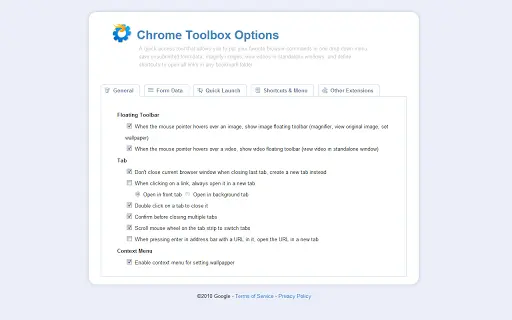
- Plugin Management Interface – Provided a user interface to manage and enable NPAPI-based extensions, though functionality is no longer operational in current browsers.
- Security Layer for Legacy Use – Included safeguards to reduce risks associated with running outdated plugins, though these protections are ineffective in modern browser environments.
These features were intended to bridge the gap between legacy software and modern browser security standards. For example, users in corporate environments could access internal training modules or asset management systems that still required Flash or Java plugins. However, since NPAPI is no longer supported, these capabilities are now non-functional.
User Interface, Workflow & Performance
The user interface of the software was designed to integrate with the browser’s extension management system, providing a straightforward panel for enabling or disabling NPAPI-based plugins. Navigation was simple, with minimal steps required to activate or deactivate legacy extensions.
Workflow efficiency was optimized for users who needed quick access to outdated web tools. However, due to the discontinuation of NPAPI support in modern browsers, the software no longer performs any active function. The developer did not specify resource usage details, and performance observations are based on general software behavior patterns.
Stability was limited to the lifespan of the browser’s NPAPI support. Since the underlying architecture is deprecated, the software cannot run reliably on current systems. No current performance data is available, as the software is no longer operational.
Compatibility & System Requirements
The software was designed for use on Windows and Mac operating systems. It was intended to function within Chrome and other browsers that previously supported NPAPI plugins. However, the developer did not provide specific version numbers, installation size, or hardware requirements.
Exact system requirements were not listed. Compatibility information was partially provided, indicating support for Windows and Mac platforms. The software is incompatible with current browser versions due to the removal of NPAPI support.
Pros and Cons
Pros
- Enabled access to legacy web applications that relied on NPAPI plugins.
- Provided a centralized interface for managing outdated browser extensions.
- Supported enterprise and educational environments with outdated internal tools.
- Offered a temporary solution for organizations not yet ready to modernize legacy systems.
Cons
- Dependent on NPAPI, which is no longer supported by modern browsers.
- Cannot function in current browser environments.
- No longer available for download or use.
- Poses potential security risks if attempted to be used on unsupported platforms.
FAQ Section
Is this software still available for download?
The developer has discontinued the extension and no longer provides it for download. It is no longer functional in current browser environments.
Can this software run on modern versions of Chrome?
No. Chrome and other major browsers have removed NPAPI support entirely. The software cannot operate on any current browser version.
Is the software safe to install?
Due to its reliance on deprecated technology, installing this software poses security risks. It is not recommended for use on modern systems.
Are there alternatives for accessing legacy web applications?
Organizations should consider migrating to modern web standards or using emulated environments, virtual machines, or updated versions of legacy software to maintain access to older tools.
Will the developer release an updated version?
There are no plans to update or re-release the software, as the underlying NPAPI framework is obsolete and unsupported.
Final Thoughts
While the software once served a critical role in maintaining access to legacy web applications, its relevance has ended with the deprecation of NPAPI support. The developer’s decision to discontinue the extension reflects the broader industry shift toward modern, secure, and standards-compliant web technologies.
For users still dependent on outdated systems, the best path forward is to explore modern alternatives, such as updated web applications, virtualized environments, or containerized solutions. Relying on discontinued tools introduces unnecessary risks and technical debt.
Download Legacy Browser Extension Support Tool now







